The Enterprise Software Problem for Small Transfer Stations
Walk into the sales process for most weighbridge software and you will quickly find it is designed for large operators — national waste management companies, high-throughput MRFs, multi-site processors. The pricing reflects this. The implementation timelines reflect this. The contracts reflect this.
For a small independent transfer station — a family-run operation taking 20 to 80 vehicles a day, perhaps one site, a yard computer running Windows, and a Weightron Bilanciai indicator that has been working reliably for a decade — the enterprise route is not proportionate.
The October 2026 DWT mandate does not distinguish between a large operator and a small one. Both must submit movement data to the EA’s Digital Waste Tracking platform from October 2026. Both face the same enforcement risk if they do not comply. But the software options and budget are very different.
This guide is written for small transfer stations — what your real options are, what each costs in time and money, and how WasteBolt Gatehouse fits into this picture.
What Weighbridge Software Actually Needs to Do
Before comparing options, it helps to separate what the DWT mandate requires from what enterprise software bundles in:
What the mandate actually requires:
- Capture weight data for each incoming movement
- Record EWC code, waste description, carrier details
- Submit this data to the EA DWT platform on the day of receipt
- Store the Waste Tracking ID returned by the platform
- Retain records for audit
What enterprise software adds (that you may not need):
- Route optimisation and vehicle scheduling
- Customer invoicing and billing integration
- Multi-site dashboards and management reporting
- Bespoke weighbridge hardware integration contracts
- Annual maintenance contracts with SLA guarantees
- Staff training packages
- Custom development for your specific setup
If you are a small independent transfer station, you likely do not need most of that second list. You need the first list, working reliably on a yard computer, without a six-month implementation project.
Your Real Options in 2026
Option 1 — Enterprise weighbridge software
Examples: Loadmaster, RecyClass, Whitman, Tradebe systems, bespoke solutions
What it offers: Full weighbridge integration, direct DWT connection (in some cases), invoicing, reporting, multi-site management.
The reality for small sites:
- Typical contract values in the thousands per year
- Implementation projects measured in months
- Requires IT support for setup and maintenance
- Often built around older technology stacks
- Some providers are still developing DWT integration — confirm before committing
When it makes sense: If you are already running one of these systems and your provider is adding DWT integration, staying put is the right call. If you are starting from scratch, the cost-benefit case for a small site is weak unless you genuinely need the wider feature set.
Option 2 — Defra web portal (manual entry)
What it offers: Free direct access to the DWT platform through a Defra web interface. No software cost.
The reality for small sites:
- Every movement entered manually, field by field, on the Defra portal
- No automatic link to your weighbridge
- No WTN generation
- No pick-lists or saved data — every carrier and waste type entered from scratch each time
- Defra has confirmed this is a temporary option that will be withdrawn
When it makes sense: Very low-volume sites — a handful of movements per week at most. For any site taking more than 10 vehicles a day, manual portal entry will consume significant staff time and introduce errors.
Option 3 — WasteBolt with CSV import
What it offers: Upload CSV exports from your existing weighbridge software into WasteBolt. AI-assisted column mapping matches your file structure to WTN fields. Batch approve movements, generate WTNs, and submit to DWT in one operation.
The reality for small sites:
- Works immediately if your current weighbridge software exports CSV
- No changes to existing weighbridge hardware or software
- Column mapping saved as a template — future imports are fast
- WTN generation and DWT submission handled by WasteBolt
- From £24.99/month — no implementation cost
When it makes sense: Sites already running Loadmaster, RecyClass, or any weighbridge software with CSV export. The lowest-friction route to DWT compliance if you have existing software.
Option 4 — WasteBolt Gatehouse (direct serial connection)
What it offers: A lightweight Windows desktop application that connects directly to your weighbridge indicator via a serial COM port. Reads live weight data, generates WTNs in WasteBolt, and submits to DWT automatically. No CSV exports. No manual weight entry.
The reality for small sites:
- Installs as a single
.exeon the yard computer — no IT team required - Connects to Weightron Bilanciai and compatible serial output indicators
- Gross and tare weights read automatically from the physical scale
- WTN generated per movement with all required fields
- DWT submission automatic on movement completion
- PDF saved locally to the yard computer — available even without internet
- Part of WasteBolt subscription — no separate software contract
When it makes sense: Sites with a physical weighbridge that has a serial output, currently running on paper dockets or a basic system. Buddy replaces the paper workflow with an automated one without replacing the weighbridge hardware.
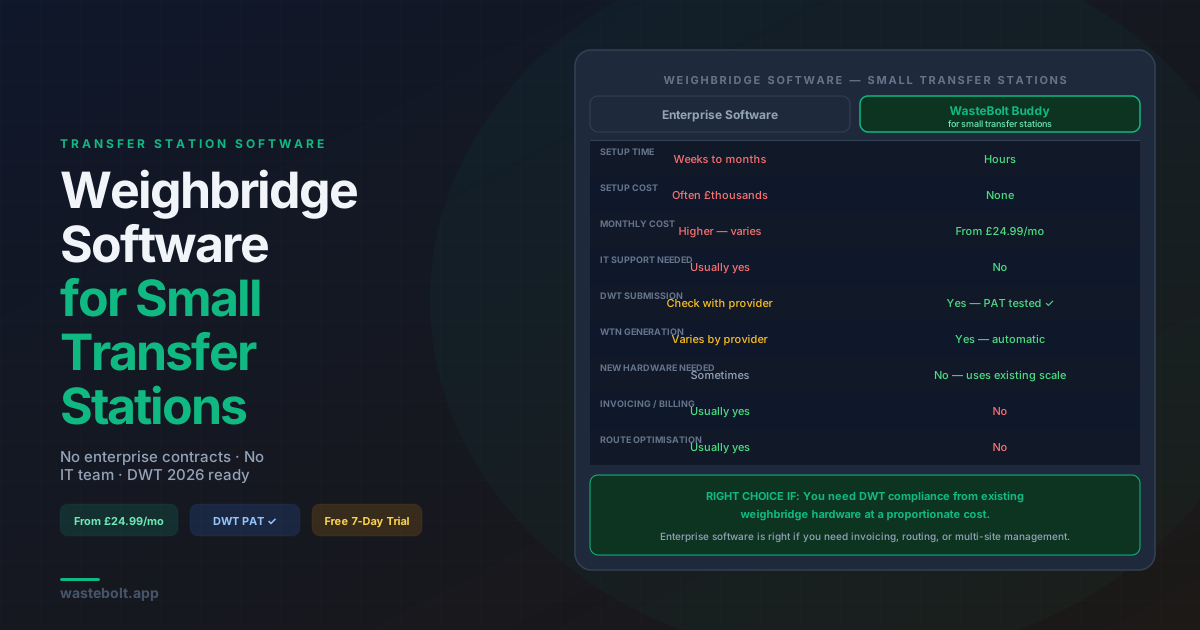
WasteBolt Gatehouse vs Enterprise Software — Honest Comparison
| WasteBolt Gatehouse | Enterprise weighbridge software | |
|---|---|---|
| Setup time | Hours | Weeks to months |
| Setup cost | None | Often thousands |
| Monthly cost | From £24.99/month | Varies — typically higher |
| IT support required | No | Often yes |
| Weighbridge compatibility | Serial output indicators | Bespoke per system |
| WTN generation | Yes | Varies by provider |
| DWT submission | Yes — PAT tested | Varies — check with provider |
| Works on old hardware | Yes — Windows 10+ | Varies |
| Invoicing and billing | No | Usually yes |
| Multi-site management | Via WasteBolt account | Usually yes |
| Route optimisation | No | Usually yes |
The honest summary: WasteBolt Gatehouse does less than enterprise software. It does not invoice customers, optimise routes, or manage a fleet. What it does do — capture weighbridge data, generate WTNs, and submit to DWT — it does well, at a cost that makes sense for a small independent site.
If you need invoicing, route optimisation, or multi-site management, you need enterprise software. If you need DWT compliance from an existing weighbridge at a proportionate cost, Buddy is worth evaluating.
Getting DWT-Ready on a Small Transfer Station Budget
The minimum viable path to DWT compliance from October 2026:
Month 1 — Assess your current setup
- Identify your weighbridge indicator make and model
- Confirm whether it has a serial output (check the indicator manual or the back of the unit for a COM port)
- Check whether you have existing software with CSV export
- Register your site on the EA DWT platform if you have not already
Month 2 — Set up WasteBolt
- Start a 7-day free trial at wastebolt.app/register
- If you have a serial output indicator: test WasteBolt Gatehouse connectivity using the simulated scale mode, then connect to your physical indicator
- If you have CSV-exporting software: upload a test CSV export and complete the column mapping
- Run 10 to 20 test movements through to DWT submission — confirm Waste Tracking IDs are returned
Month 3 onwards — Run in parallel
- Run WasteBolt alongside your existing paper or spreadsheet process for a month
- Catch any edge cases — unusual waste types, irregular carriers, hazardous movements
- Train all yard staff on the Buddy or WasteBolt workflow
October 2026 — Switch over
- Paper dockets become supplementary rather than primary
- Every movement goes through WasteBolt for DWT submission
- Your audit trail is digital, searchable, and permanently stored
Frequently Asked Questions
What is the minimum cost to get DWT-compliant on a small transfer station? A WasteBolt account starts from £24.99 per month. There is no setup fee, no implementation cost, and no hardware cost if you have an existing serial output weighbridge. The 7-day free trial lets you test the full workflow before committing.
Do I need to buy new weighbridge hardware? No. WasteBolt Gatehouse connects to your existing indicator via a serial cable. If your indicator has a COM port output, you do not need to replace it.
What if my weighbridge indicator is very old? Older Weightron Bilanciai and similar indicators typically have serial output even if they do not have modern connectivity. Check the back panel for a 9-pin serial (DB9) connector. If it is there, Buddy can connect to it. Contact the WasteBolt team with your indicator model to confirm.
Can I use WasteBolt for my WTNs and a different system for DWT? Yes, but it creates double-entry. The benefit of WasteBolt is that the WTN and DWT submission happen from the same data entry — completing one movement in Buddy generates the WTN and submits to DWT in a single step.
What if I get more vehicles than I expected and need more features? WasteBolt scales with you. Higher-tier plans add driver seats, task management, and additional features. If you outgrow WasteBolt entirely and need full enterprise weighbridge software, the data in your WasteBolt account can be exported.
Last updated: September 2026. October 2026 DWT mandate applies to England and Wales. Scotland and Northern Ireland follow January 2027. WasteBolt Gatehouse supports Weightron Bilanciai and compatible serial output indicators.