Who This Guide Is For
This is a practical setup guide for waste receiving sites that need to comply with Defra’s Digital Waste Tracking (DWT) mandate, effective October 2026. If your site holds an environmental permit or registered exemption to receive waste, you must report every waste receipt to Defra’s Report Receipt of Waste service — and WasteBolt can do this automatically once you complete the four steps below.
Waste producers and carriers: DWT reporting via WasteBolt is for waste receivers only. Do not submit to Defra if your site only produces or carries waste.
What You’ll Need
Before you start, make sure you have:
- Admin access to WasteBolt — seat users cannot access Settings
- A Defra portal account — Government Gateway or GOV.UK One Login
- Your Defra API Code — a UUID issued per registered receiving site (see Step 1)
- Your site’s environmental permit or exemption reference number (needed if registering for the first time)
How the API Connection Works
Before diving into the steps, it helps to understand how WasteBolt connects to Defra on your behalf.
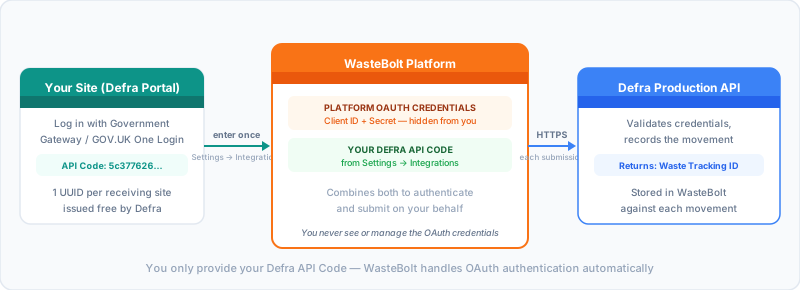
WasteBolt holds platform-level OAuth credentials (a Client ID and Client Secret) centrally — you never see or manage these. The only thing your site provides is your unique Defra API Code. WasteBolt combines both to authenticate with Defra’s production OAuth service, then submits waste movements on your behalf, returning a Waste Tracking ID for each successful submission.
Step 1: Register with Defra and Get Your API Code
If your organisation is not yet registered on the Defra waste tracking service, register at:
gov.uk/guidance/report-receipt-of-waste
You’ll need:
- A Government Gateway or GOV.UK One Login account
- Your environmental permit number or registered exemption reference
- Basic site details (name, address, contact)
Once registered, Defra issues your organisation a unique API Code — a UUID in the format xxxxxxxx-xxxx-xxxx-xxxx-xxxxxxxxxxxx. You’ll find it in your Defra portal account settings under “API code” or “API access”.
If you’re already registered and just need your code, log into the Defra waste tracking portal and look in your account settings.
Can’t find your API Code? Contact Defra at wasteuserresearch@defra.gov.uk.
Step 2: Enter Your API Code in WasteBolt
With your API Code in hand, log into WasteBolt and go to:
Business Settings
Scroll to the Digital Waste Tracking (DWT) section.
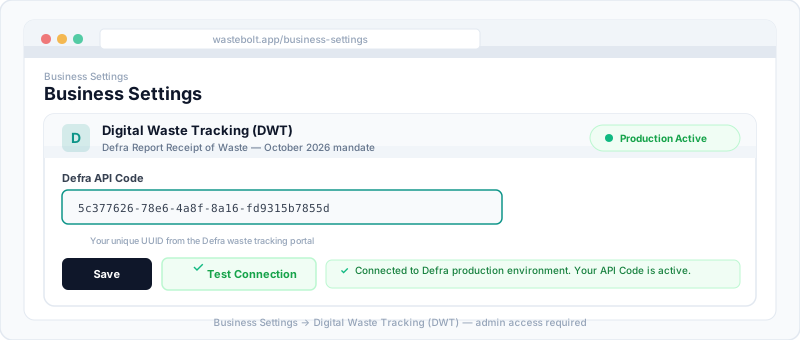
- Click the Defra API Code field
- Paste your UUID exactly as provided by Defra — no spaces before or after
- Click Save
Your API Code is now stored securely against your admin account.
Step 3: Test the Connection
After saving, click Test Connection. WasteBolt performs three checks in sequence:
- Format validation — confirms your API Code is a valid UUID
- OAuth authentication — confirms WasteBolt’s platform credentials work with Defra’s production OAuth service
- API reachability — confirms Defra’s DWT API endpoint is responding
Green tick — Connected: Your site is live on Defra’s production environment. DWT submission buttons are now active across the platform.
Red warning — Failed: See the Troubleshooting section below.
Step 4: Submit Waste Movements to Defra
Once connected, waste movements recorded in WasteBolt can be submitted to Defra from the DWT hub.
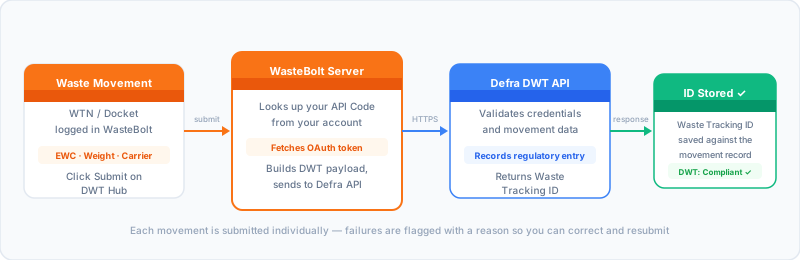
To submit a movement:
- Go to your Digital Waste Tracking hub (
/digital-waste-tracking) - Find the movement you want to submit (WTN, docket, or weighbridge record)
- Click Submit to Defra
- WasteBolt sends the movement to Defra’s production API
- A Waste Tracking ID is returned and stored against the movement record
Successfully submitted movements are marked with a Waste Tracking ID and a green status. Failed submissions are flagged with the reason so you can correct and resubmit.
Understanding Your Waste Tracking IDs
Each successfully submitted movement gets a unique Waste Tracking ID from Defra. This ID:
- Proves the movement was reported to Defra
- Is stored permanently against the movement record in WasteBolt
- Can be referenced if Defra queries the movement
- Is visible on the movement record and in your DWT hub
Keep your DWT hub exports as part of your regulatory records alongside your WTNs and transfer notes.
Troubleshooting
“API Code format is invalid”
Your code must be a UUID in the format xxxxxxxx-xxxx-xxxx-xxxx-xxxxxxxxxxxx. If you copied it from an email, paste into a plain text editor first to strip hidden characters, then copy into WasteBolt.
“Could not authenticate with Defra” This is a platform-level issue, not your API Code. Try again in a few minutes. If it persists, contact WasteBolt support.
“Defra API responded with error 400 or 422” The movement data has a validation issue. Common causes: missing or invalid EWC code, quantity outside permitted range, or permit reference mismatch. Check the movement details and correct before resubmitting.
“Defra API responded with error 500 or 503” Defra’s service is temporarily unavailable. Wait a few minutes and try again.
DWT submission button is greyed out Either your API Code is not saved (check Business Settings) or your site’s permit or authorisation number is missing from your WasteBolt site profile.
Movement shows as submitted but no Tracking ID Check the movement record — if Defra’s response was delayed, the ID may take a few minutes to appear. If still missing after 10 minutes, contact WasteBolt support.
Quick Reference
| What | Where in WasteBolt |
|---|---|
| Enter your API Code | Business Settings → DWT section |
| Test the connection | Business Settings → Test Connection |
| Submit a movement | DWT Hub → select movement → Submit to Defra |
| View Tracking IDs | DWT Hub → movement record |
| Change your API Code | Business Settings → paste new code → Save |
Need help? Contact WasteBolt support or visit the DWT credentials guide for more detail on the API Code setup. The October 2026 DWT mandate applies to permitted waste receiving sites in England and Wales; Scotland and Northern Ireland follow from 1 January 2027.
What’s Next
- How to Submit Waste Movements to DWT — once connected, the full submission walkthrough.
- What Information Do I Need for DWT? — every field Defra requires, and what to enter when the normal answer is missing.
- DWT Submission Rejected — Common Fixes — troubleshooting Errors and Warnings on the DWT page.